
An Apple Watch Voice Recorder That Turns Speech into Text
Updated
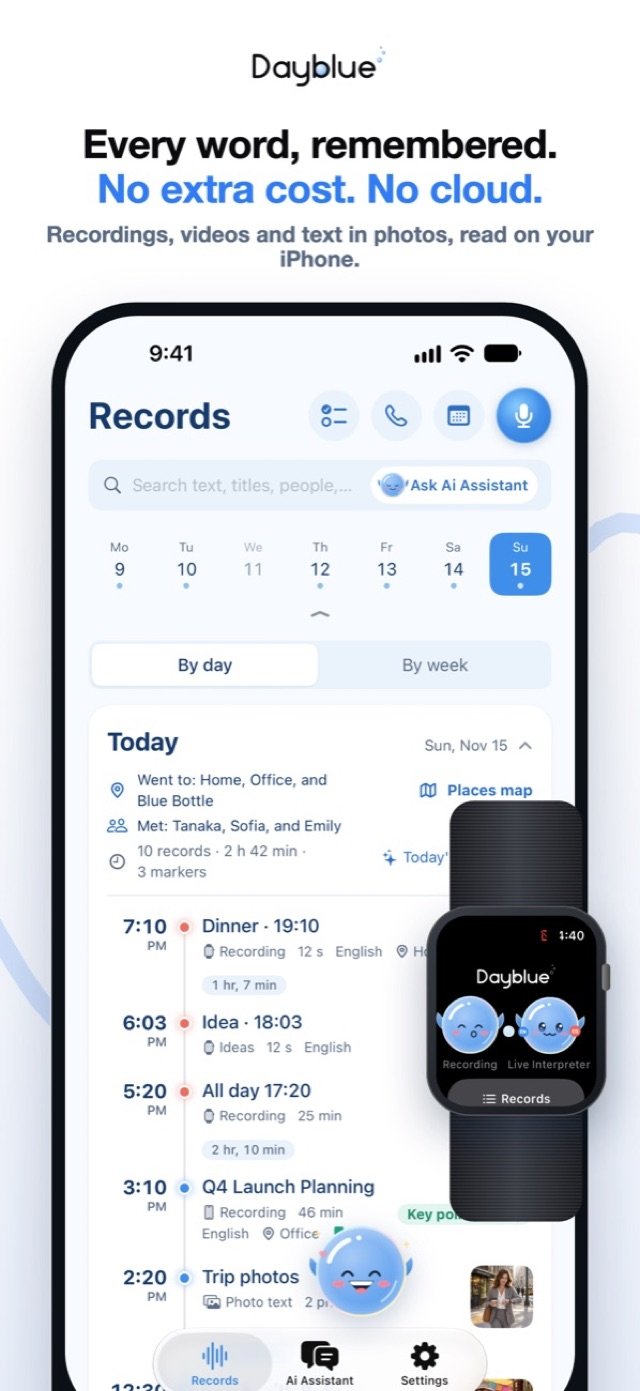
Dayblue is an Apple Watch voice recorder with transcription. One tap on your watch face starts recording, even when your iPhone is somewhere else. When the Watch and iPhone are together again, the recording moves over automatically, and your iPhone turns it into text on the device, with no internet needed after a one-time model download.
A hallway idea, a lecture, a walk
You leave a meeting, and an idea hits you in the hallway. Your iPhone is still in your bag in the conference room. You tap Dayblue on your watch face and say the idea out loud as you walk. Back at your desk, the recording has moved to your iPhone and turned into text.
Or you sit in a lecture. You tap once on your wrist, and the Watch records while your phone stays in your pocket. When you open Dayblue that evening, the full transcript follows, with the speakers told apart and the key points written for you.
Quick voice memos on Apple Watch are easy to capture and easy to forget. Dayblue's job is to turn them into something you can read, ask about and share.
How it works
- Put Dayblue on your watch face. Add the Dayblue complication. One tap on it starts recording.
- Or start it another way. You can also start a recording with Siri, a Shortcut or a widget.
- Record, with or without your iPhone. The Watch records on its own. Your iPhone does not need to be nearby.
- Tap Stop on the Watch. When your Watch and iPhone are together again, the recording moves to the iPhone automatically.
- Your iPhone transcribes it. A quick draft comes first, then the full transcript. Dayblue tells speakers apart and translates foreign-language speech into your native language.
- Read the key points. The built-in model writes key points, decisions and to-dos on your iPhone. Tap any line to replay the original audio.
If a recording arrives from the Watch while Dayblue is in the background, it gets its quick draft right away. The full transcript starts the next time you open Dayblue. You will find the record on the home screen, which shows each day as a timeline.
Key points need an iPhone with 6 GB of memory or more: iPhone 12 Pro / 12 Pro Max, 13 Pro / 13 Pro Max, and iPhone 14 or later. On iPhone 11, 12, 12 mini, 13, 13 mini and SE, Dayblue transcribes and tells speakers apart, but does not write key points yet.
Transcribe Apple Watch recordings on your iPhone
The Watch captures the sound. The iPhone does the heavy lifting. That split lets you record anywhere and still get a full transcript.
On your iPhone, Dayblue tells speakers apart. Name a person once, and they are recognized automatically after that. Foreign-language speech is translated into your native language, and you can tap any line to hear the original. On iOS 26, transcription and summaries keep going when you lock your iPhone or switch to another app, and the progress shows on the Lock Screen.
If your recording is from a meeting, the same notes appear as with an iPhone recording. Our guide to AI meeting notes on iPhone covers that flow in detail.
More than a recorder on your wrist
- Ask Dayblue by voice. Ask about your records from your wrist. Your iPhone, which must be nearby, works out the answer, and your Watch reads it aloud.
- Live translation. When someone speaks another language, the translation from Live Interpreter shows on your Watch, and the Watch's microphone can be used. Read more about live translation on Apple Watch.
- Call translation. Put a call on speaker, and your Watch listens to the other person for you.
- Word reviews. Foreign words from your recordings go into your Word Book, and you can review them on the Watch.
For live and call translation, the Watch runs a "workout" session so it keeps going with your wrist down. Dayblue reads no health data, saves no workouts, and you can turn this setting off.
What works offline, and what needs internet
Works with no internet:
- Recording on the Watch, with no iPhone nearby
- Transcription on your iPhone, once the on-device models have downloaded over Wi-Fi (about 2.6 GB on some iPhones)
- Key points, decisions and to-dos from the built-in model
- Live translation on the Watch, once your languages are downloaded in Live Interpreter → Settings → Language packs and your iPhone is nearby
Needs internet:
- The one-time downloads
- Cloud AI, which is optional and off by default
- Web lookups, also off by default
Privacy, in plain words
Your voice memos stay yours. Recordings, text, photos and places stay on your own devices. A recording goes from your Watch to your own iPhone. There are no ads, no analytics, no tracking and no account.
Cloud AI is optional and off by default. If you turn it on, you use your own API key, content goes straight from your device to the provider you chose, and you pay them directly. See the privacy policy for more.
Honest limits and tips
- Ask before you record. If other people are in the recording, get their consent first.
- Replay what matters. Transcripts and translations are made by AI and can be wrong. For anything important, tap the line and hear the original audio.
- The Watch records alone, but it does not interpret alone. Live translation and Ask Dayblue need your iPhone nearby, because the iPhone does the recognition.
- Check the requirements. Dayblue needs iOS 26 for transcription and live interpretation. On earlier versions, it can only record. The Watch features need watchOS 11.
- Open Dayblue to finish the job. A recording that arrives in the background gets its quick draft right away. Open the app to start the full transcript.
- Mind the distance. Your wrist is often closer to the speaker than your phone. In a lecture or a small group, that helps.
FAQ
Can I record on Apple Watch without my iPhone?
Yes. The Watch records on its own. The recording moves to your iPhone automatically when the two are together again.
Where are my Apple Watch recordings transcribed?
On your iPhone, on the device. After the models download once over Wi-Fi, no internet is needed.
How do I start a recording quickly?
Tap Dayblue on your watch face. You can also start it with Siri, a Shortcut or a widget.
Do I need an Apple Watch to use Dayblue?
No. The Watch app is optional. Everything also works on the iPhone alone.
Which watchOS version do I need?
The Watch features need watchOS 11. Your iPhone needs iOS 26 for transcription and live interpretation.
Coming soon to the App Store
Dayblue is coming soon to the App Store for iPhone, with an optional Apple Watch app. Learn more on the Dayblue home page. Then see how Dayblue writes meeting notes on iPhone and how its offline translation app for iPhone handles conversations in other languages. Questions? Visit Dayblue support.
Dayblue is coming soon to the App Store.
 Coming soon to the App Store
Keep reading
- Live Translation Without Internet, on iPhone and Apple WatchReal-time translation without internet. Dayblue's Live Interpreter runs on your iPhone, shows on Apple Watch, and saves each talk in your language.
- AI Meeting Notes on iPhone, Written on Your DeviceTranscribe meetings on iPhone with speaker identification, key points, decisions and to-dos, all written on the device. No account, no subscription.