

AI Meeting Notes on iPhone, Written on Your Device
Updated
If you want an AI meeting notes app for iPhone that keeps your conversations on your phone, Dayblue records the meeting, transcribes it on the device, tells speakers apart, and writes the key points, decisions and to-dos with its built-in model. After a one-time model download, transcription works with no internet. There is no account and no subscription.
A supplier call that changes the plan
It is Tuesday. Your team meets in a conference room, and a supplier abroad joins on speakerphone. Halfway through, their logistics lead explains a shipping delay, partly in Spanish. Someone moves the delivery date. Someone else promises to update the budget.
You started a recording on your iPhone and set it on the table. When the delay came up, you tapped Marker. Your phone rang in the middle, and the recording kept going.
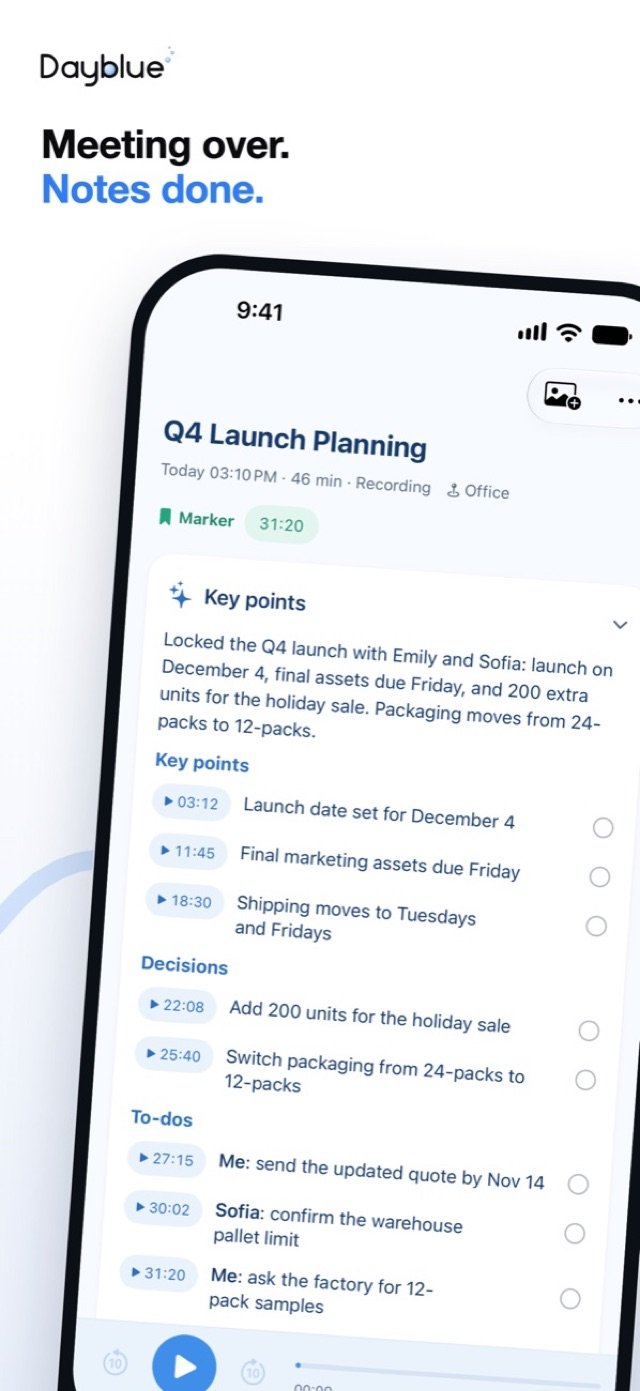
After the meeting, you tap Stop. A quick draft appears within seconds, then the full transcript. Each speaker has their own label. The Spanish part is translated into English. You find the key points, the decisions and the to-dos, and you share them with your team in Slack in one tap.
Two weeks later, someone asks when the delivery moved to. You ask Dayblue instead of digging through notes, and the answer comes back with the original words.
How it works
- Download the on-device models once. Dayblue downloads them over Wi-Fi (about 2.6 GB on some iPhones). After that, transcription works with no internet.
- Start recording. Start on your iPhone, or tap once on your Apple Watch. On the iPhone, recording continues with the screen locked.
- Tap Marker at key moments. Later, you can jump straight back to them.
- Let calls come in. An incoming call does not end the recording. It keeps recording while the phone rings, pauses while you take the call on the iPhone, and resumes when you hang up. Only Stop ends it.
- Tap Stop. A quick draft appears within seconds, followed by the full transcript with speakers told apart.
- Name each speaker once. Use Rename speaker to give a voice a name. After that, Dayblue recognizes that person automatically.
- Read the notes. Key points, decisions and to-dos are written on your iPhone by the built-in model. Tap any line to replay the original audio.
- Share in one tap. Send the transcript and notes through the system share sheet to Messages, Mail, Slack and more.
Key points, decisions and to-dos need an iPhone with 6 GB of memory or more: iPhone 12 Pro / 12 Pro Max, 13 Pro / 13 Pro Max, and iPhone 14 or later. iPhone 15 Pro and later use Apple Intelligence, with no download. The others download the model once (about 2.6 GB). On iPhone 11, 12, 12 mini, 13, 13 mini and SE, Dayblue transcribes and tells speakers apart, but does not write key points yet.
Speaker identification that remembers people
Speaker identification turns a wall of text into a conversation you can follow. Dayblue tells speakers apart in each recording. Once you name someone, they are recognized automatically after that, so a weekly meeting with the same team only needs naming once.
Foreign-language speech, translated
When someone in the meeting speaks another language, Dayblue translates it into your native language in the transcript. Tap the line to hear what they actually said. If you need to follow a foreign-language conversation as it happens, use Live Interpreter instead. Our guide to the offline translation app for iPhone shows how it works.
On iOS 26, it keeps working in the background
On iOS 26, transcription and summaries keep going when you lock your iPhone or switch to another app. Progress shows on the Lock Screen, so you can close the app and walk to your next meeting.
Meetings that did not happen in the room
You can also import audio files and call recordings, and the sound of a video becomes a transcript too. Share PDF, Word, Excel and PowerPoint files to Dayblue, and each becomes a record. The home screen shows each day as a timeline, so a meeting and its slides sit on the same day.
Ask your records
Notes help only if you can find things later. In Ai Assistant, ask in text or by voice, for example "What day did the supplier move the delivery to?" The answer comes with the original words, and one tap replays them.
What works offline, and what needs internet
On-device transcription is the core of Dayblue. Here is what runs where.
Works with no internet, after the one-time model download:
- Recording on your iPhone or Apple Watch
- On-device transcription
- Speaker identification
- Key points, decisions and to-dos from the built-in model
Needs internet:
- The one-time model download, over Wi-Fi
- Cloud AI, which is optional and off by default
- Web lookups for weather, exchange rates, encyclopedia and news, also off by default
Meeting minutes without a subscription
Dayblue is a paid app with no subscription and no account. The key points come from the built-in model on your iPhone, so no external AI is needed to get your meeting minutes.
If you want to use a cloud model, Cloud AI is optional. You connect your own API key from the provider you choose. Content goes straight from your device to that provider, and you pay them directly.
Privacy, in plain words
Meetings hold sensitive things: numbers, names and plans. With Dayblue, recordings, text, photos and places stay on your own devices. There are no ads, no analytics, no tracking and no account. Cloud AI and Web lookups are off by default, and you decide if and when to turn them on. Web lookups send only the query. Read the privacy policy for the details.
Honest limits and tips
- Ask for consent first. Tell people you are recording and get their OK before you start.
- AI can make mistakes. Transcripts, translations and notes are made by AI and can be wrong. For anything important, like a number or a deadline, tap the line and replay the original audio.
- Check before you share. Once you share notes, they leave Dayblue. Make sure the others in the meeting agree.
- Check your iOS version. Dayblue needs iOS 26 for transcription and live interpretation. On earlier versions, it can only record.
- Key points need 6 GB of memory. On iPhone 11, 12, 12 mini, 13, 13 mini and SE, you get the transcript with speakers told apart, but not key points yet.
- Download before the big meeting. Let the on-device models finish downloading on Wi-Fi before you rely on them.
- Place the phone near the talkers. Set your iPhone close to the people speaking. In a walking meeting, a tap on your Watch keeps the microphone close.
FAQ
Can I transcribe meetings on iPhone without internet?
Yes. After the on-device models download once over Wi-Fi, transcription runs on your iPhone with no internet.
Can Dayblue tell who said what?
Yes. Dayblue tells speakers apart. Name a person once, and they are recognized automatically after that.
Which iPhones write key points?
The built-in model writes key points, decisions and to-dos on an iPhone with 6 GB of memory or more: iPhone 12 Pro / 12 Pro Max, 13 Pro / 13 Pro Max, and iPhone 14 or later. On iPhone 11, 12, 12 mini, 13, 13 mini and SE, Dayblue transcribes and tells speakers apart, but does not write key points yet. No external AI is needed.
Is there a subscription?
No. Dayblue is a paid app with no subscription and no account.
Can I record a meeting on my Apple Watch?
Yes. One tap on the watch face starts recording, and the recording moves to your iPhone for transcription. See our guide to the Apple Watch voice recorder.
Coming soon to the App Store
Dayblue is coming soon to the App Store for iPhone, with an optional Apple Watch app. Learn more on the Dayblue home page. For conversations in another language, read about real-time translation without internet. For ideas that strike away from your desk, see how to record on Apple Watch. Questions? Visit Dayblue support.
Dayblue is coming soon to the App Store.
 Coming soon to the App Store
Keep reading
- Live Translation Without Internet, on iPhone and Apple WatchReal-time translation without internet. Dayblue's Live Interpreter runs on your iPhone, shows on Apple Watch, and saves each talk in your language.
- An Apple Watch Voice Recorder That Turns Speech into TextRecord on Apple Watch with one tap, even without your iPhone nearby. Dayblue then transcribes it on your iPhone, with speakers and key points.