

Voice Journal: Record Your Day in Your Own Voice
Updated
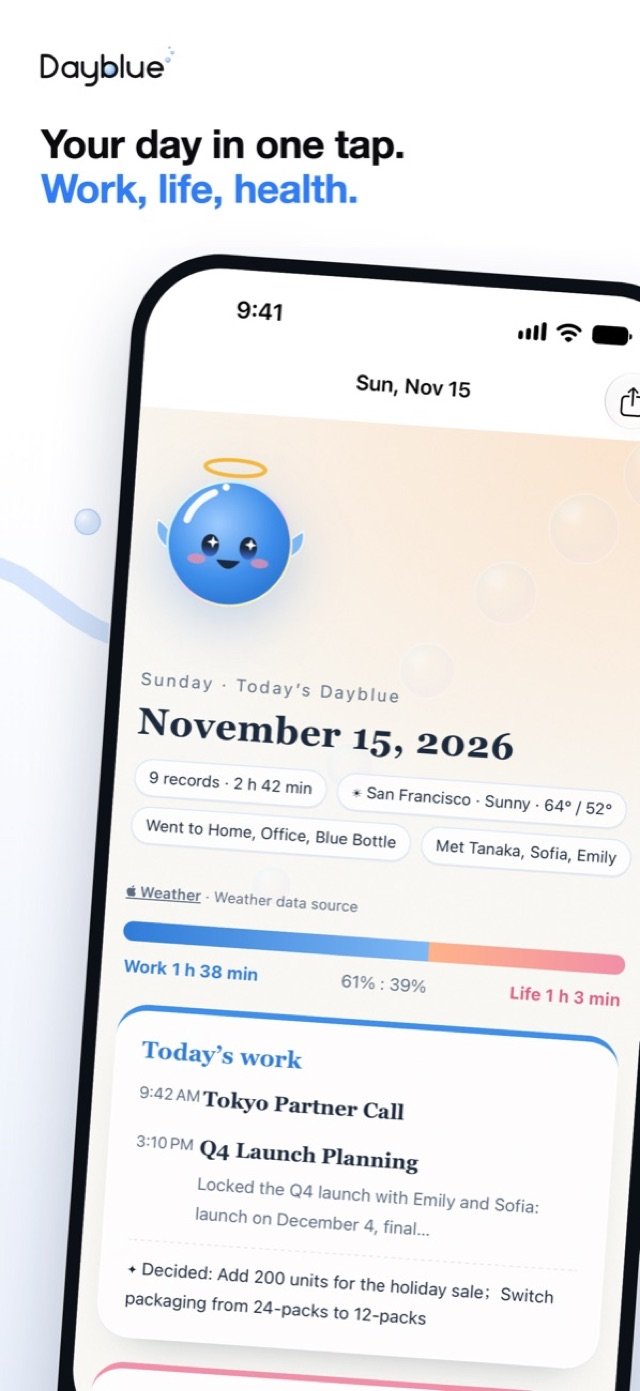
A voice journal is a diary you speak instead of write. Dayblue makes it fit a busy day: tap once on your iPhone or Apple Watch to record, and your iPhone turns your voice into text, tells speakers apart and translates other languages into your own. Each day is laid out as a timeline, and at night one tap gives you a recap. It is a voice diary, an audio journal and a voice recorder in one app, and your recordings stay on your own devices.
Why speak your journal instead of writing it
Many journals stop after a week or two. Not because nothing happened. Because at 11 p.m., a blank page asks too much: remember the day, pick the words, type them.
Talking asks less. You can say three sentences while you walk the dog or wait for the kettle. You do not have to sound good. You just say what happened, how it felt and what comes next.
Much of your day also happens out loud: the plan your team made at 10, the story your dad told on the phone. With the other person's OK, those can go in your journal too. Dayblue turns all of it into something you can read, search and look back on.
A day with Dayblue
7:40 a.m., on the way to the train. An idea for the weekend hits you, and your iPhone is in your bag. You tap Dayblue on your watch face and say it as you walk. The Watch records on its own and moves the recording to your iPhone when they are together again. More on the Apple Watch voice recorder.
10:00 a.m., team check-in. You tell the room you are recording and set your iPhone on the table. Priya brings up a new launch date, so you tap Marker. When you tap Stop, a quick draft appears within seconds, then the full transcript. For key points, decisions and to-dos, see AI meeting notes on iPhone.
1:15 p.m., a message from home. Your mom sends a long WhatsApp voice message about Thanksgiving plans. You share it to Dayblue. It becomes a record of the day, turned into text you can read later with the sound off.
7:00 p.m., dinner with family. Your partner's grandmother tells a story in Spanish. With everyone's OK, you record it. In the transcript, her Spanish is translated into English, and you can tap any line to hear her voice again. To follow along as she speaks, use Live Interpreter: see real-time translation without internet.
10:30 p.m., before bed. You tap record and talk for a minute: the good part, the hard part, one thing for tomorrow. Then you tap Today's Dayblue and read your day on one page.
Not every day needs all of this. Some days it is one memo on your wrist. That still counts.
What you get back
Text and translation
Dayblue does the voice to text on your iPhone. A quick draft comes first, then the full transcript. It tells speakers apart. Name a person once with Rename speaker, and they are recognized automatically after that. Foreign-language speech is translated into your native language, and you can tap any line to replay the original voice.
Each day as a timeline
The home screen shows each day as a timeline: where you went, who you met (the people you have named), then the records in order. Photos, videos and files fit in too. The sound of a video becomes text, and so does the text in a photo (Chinese, Japanese, English or Korean). You can import audio files and call recordings. Voice messages and chats shared from WhatsApp, LINE and WeChat each become a record, and so do PDF, Word, Excel and PowerPoint files.
Today's Dayblue, your daily recap
One tap gives you who you met, where you went, what you talked about, how the day split between work and life, and the words you learned. If you like, it can add the weather. It asks you first and sends only an approximate location (about 1 km) to Apple Weather. Turn on the Health helper on your Apple Watch (it is off by default), and the recap also shows the day's health.
Ask your own records
Months later, you will not remember the exact words. You do not have to. In Ai Assistant, ask in text or by voice, for example "What did Priya say about the launch date?" The answer comes with the original words, and one tap replays them. On your Watch, ask by voice: your iPhone, which must be nearby, works out the answer, and the Watch reads it aloud.
A word book from your own life
Foreign words from your recordings and Live Interpreter sessions go into your Word Book automatically. You can also learn words by scene, 5 at a time, practice them with Repeat After Me, and review them on your Watch.
How to start
- Install Dayblue on your iPhone. It needs iOS 26. Let the on-device models download once over Wi-Fi (about 2.6 GB on some iPhones). After that, transcription works with no internet.
- Put Dayblue on your watch face (optional). One tap on it starts recording. You can also use Siri, a Shortcut or a widget. The Watch features need watchOS 11.
- Record the moments. Tap Start recording on your iPhone, or tap your wrist. On the iPhone, recording continues with the screen locked, and an incoming call does not end it.
- Close the day. Name new voices once, say a few words about how the day went, then tap Today's Dayblue.
A simple prompt helps on tired nights: one thing that happened, one thing you felt, one thing for tomorrow. Thirty seconds is enough.
Privacy, in plain words
A diary is personal. With Dayblue, recordings, text, photos and places stay on your own devices. There is no account, no ads, no analytics and no tracking. Web lookups are off by default and send only the query. Cloud AI is optional and off by default. If you turn it on with your own API key, content goes straight from your device to the provider you chose, and you pay them directly. Read the privacy policy for the details.
Honest limits and tips
- Ask before you record others. Your own thoughts are yours to record. Other people's voices are not. Tell them, and get their OK first.
- AI text can be wrong. Transcripts and translations are made by AI. For anything important, tap the line and replay the original voice.
- Check your iPhone. Dayblue needs iOS 26. Meeting key points need an iPhone with 6 GB of memory or more (iPhone 12 Pro, 13 Pro, iPhone 14 or later).
- The Watch records alone, but it does not answer alone. Asking from your wrist and live translation need your iPhone nearby.
- Health is a nudge, not a diagnosis. Dayblue is not a medical device.
FAQ
What is a voice journal?
A voice journal, or voice diary, is a journal you keep by speaking. With Dayblue, you tap to record, and your iPhone turns the recording into text and places it on that day's timeline.
Do I need an Apple Watch?
No. Everything works on the iPhone alone. The Watch adds one-tap recording from your wrist, even without your iPhone nearby.
Are my recordings uploaded?
No. Recordings, text, photos and places stay on your own devices. Content goes to a cloud AI provider only if you turn on Cloud AI with your own API key.
Does it work without internet?
Yes, for recording and transcription, once the on-device models have downloaded over Wi-Fi. Weather, web lookups and Cloud AI need internet, and all of them are optional.
What is in the daily recap?
Who you met, where you went, what you talked about, how the day split between work and life, and the words you learned. The weather and the day's health from your Watch are optional.
Get Dayblue on the App Store
Dayblue is on the App Store for iPhone, with an optional Apple Watch app. No account, no subscription. Learn more on the Dayblue home page. Keep reading: meeting notes on iPhone, the offline translation app for iPhone and the Apple Watch voice recorder. Questions? Visit Dayblue support.
Dayblue is on the App Store. No account, no subscription.
 Download on the App Store
Keep reading
- Live Translation Without Internet, on iPhone and Apple WatchReal-time translation without internet. Dayblue's Live Interpreter runs on your iPhone, shows on Apple Watch, and saves each talk in your language.
- AI Meeting Notes on iPhone, Written on Your DeviceTranscribe meetings on iPhone with speaker identification, key points, decisions and to-dos, all written on the device. No account, no subscription.
- An Apple Watch Voice Recorder That Turns Speech into TextRecord on Apple Watch with one tap, even without your iPhone nearby. Dayblue then transcribes it on your iPhone, with speakers and key points.